
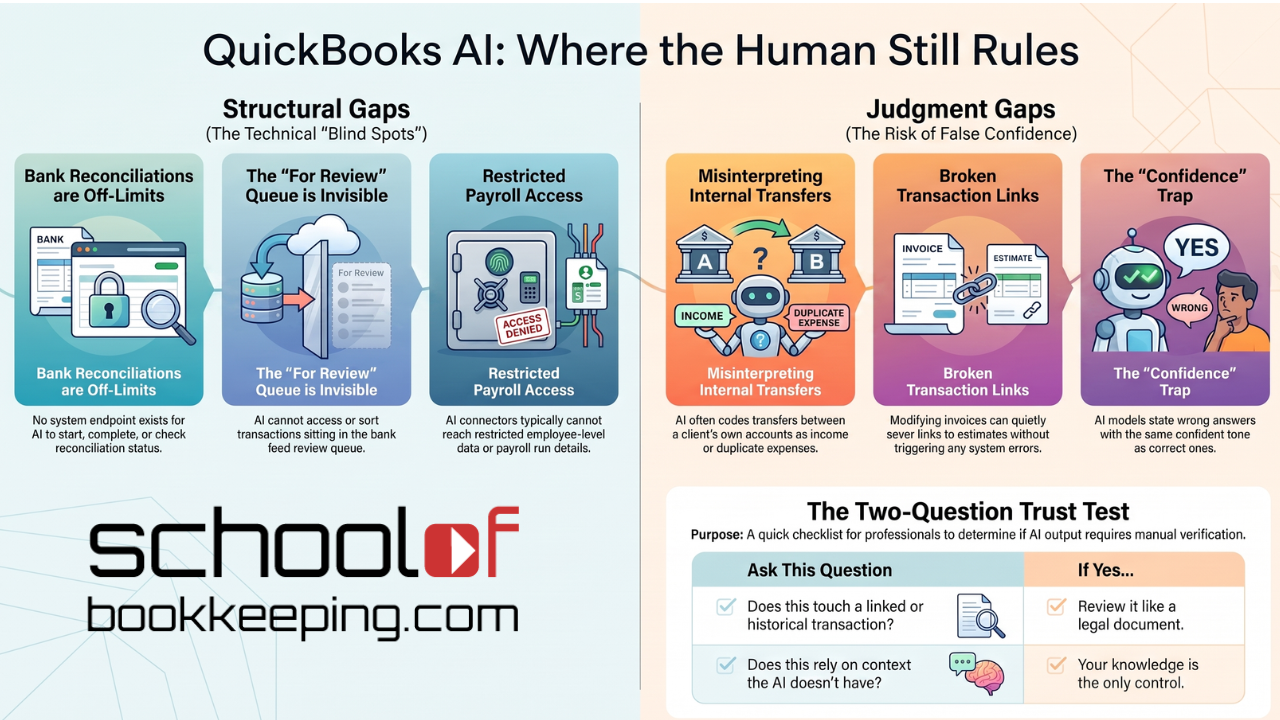
In Part 1 of our AI in Accounting Series, we made the case that AI isn't erasing the bookkeeping job, it's compressing the typing and concentrating the judgment. This post gets specific about where that judgment actually has to show up, because "use good judgment" is useless advice without examples.
There are two different kinds of gaps here, and they call for two different kinds of human involvement. Mixing them up is how firms end up either over-trusting a tool that can't see what it needs to see, or under-trusting one that's actually fine.
This is also, not coincidentally, the real answer to the question you've almost certainly heard by now, or will: "can't I just do this myself with AI?" The honest answer is "partly, and here's exactly the part that's still risky if you do." These two categories are that answer, in specifics instead of a vague no.
Kind One: Structural Gaps (The AI Literally Cannot Do This)
Some parts of QuickBooks simply aren't reachable through the API that Claude, or any third-party AI connector, uses. Not "reachable but risky." Not exposed at all.
- Bank reconciliation. There is no endpoint to start, complete, or check the live status of a reconciliation. None. Whatever an AI tool tells you about your reconciled balance, it's inferring it from posted transactions, not looking at the actual reconciliation record. Yes, Intuit has a purpose built AI Reconciliation workflow directly in QuickBooks, however that works best when there aren't duplicate or missing transactions. Human oversight is still needed to research those anomalies.
- The bank feed "For Review" queue. The queue where uncategorized transactions sit before they hit your books, and the rules engine that sorts them, isn't exposed either. An AI can review what's already been categorized. It cannot touch what's still sitting in review.
- Merging duplicate customers or vendors. There's no merge endpoint. Intuit built it that way on purpose, because merging rewrites transaction history in ways that are hard to unwind, the same category of risk we walked through with the broken linked-estimate story in our first post.
- Payroll detail. The general QuickBooks Accounting API, and any connector built on it, typically can't reach payroll run detail or employee-level data at all. That access sits behind a separate, far more restricted system.
This first kind of gap is actually the easy one to manage, because there's no ambiguity. Nobody has to "evaluate the AI's output" on reconciliation, because there isn't any AI output on reconciliation. You just do that part yourself, the way you always have. The risk here isn't that AI gets it wrong. It's that someone assumes AI is handling it, and nobody checks.
The practical takeaway: know your tool's structural gaps and build them into your workflow as fully manual steps, not "AI-assisted" steps. If a task shows up on our 81-task QuickBooks widget with a limitation like "no endpoint exists," that's not a bug to wait out. It's a permanent line in the process that has your name on it.
Kind Two: Judgment Gaps (The AI Can Do This, But Shouldn't Be Trusted Alone)
This is the harder category, because the AI produces a real, plausible-looking answer. The problem isn't that it fails to respond. It's that it responds with confidence regardless of whether it's right.
A few examples of what this actually looks like in a QuickBooks file:
- A transfer between two of the client's own accounts gets coded as income or a duplicate expense, because on the surface it looks like an external transaction. It's the kind of thing that's obvious to someone who knows the client has three bank accounts, and invisible to a system that's only ever seen the transaction in isolation.
- A real seasonal pattern gets flagged as an anomaly, or a real anomaly gets missed because it resembles the client's normal noise. Anomaly detection is pattern matching. It doesn't know that this client always has a slow February, or that this vendor always double-bills in December and issues a credit in January.
- A "fix" to an estimate or invoice quietly breaks the link to everything tied to it. This is the exact scenario from our first post: the visible parts looked fine after the edit, but the underlying relationship between the estimate and the invoices billed against it didn't survive. Nothing in the interface screamed "this is now broken." A report eventually did.
- A vendor gets miscategorized as under the 1099 threshold because their payments are split across two vendor records that look different enough not to get flagged as duplicates, an outcome that's more likely, not less, precisely because there's no merge tool forcing anyone to notice the duplication.
- A bulk categorization suggestion gets applied broadly based on a rule that's right 95% of the time, and wrong for the one vendor whose name happens to resemble a completely different, larger category of spend.
None of these are hypothetical edge cases dreamed up to make a point. They're the ordinary ways pattern-matching breaks: not with an error message, but with a confident, well-formatted, entirely wrong answer sitting in a report that looks exactly like every other report.
Why "Confident" Is the Word to Watch For
We said this in the first post and it's worth repeating on its own: AI's real failure mode isn't uncertainty, it's confidence. A person who isn't sure says "I think this is right, can you double check?" A model, by default, doesn't hedge unless it's specifically built and prompted to. It states the categorization, the anomaly, the "fix," in the same tone whether it's dead right or completely off.
That means the review step can't be "does this look reasonable?" A wrong answer from AI is specifically engineered, by the nature of how these tools generate language, to look reasonable. The review step has to be "do I know something about this client, this account, or this transaction that the model couldn't have known?" That's a different question, and it's the one only a human with actual client context can answer.
A Two-Question Test Before You Trust Any AI Output in QuickBooks
Before accepting a categorization, a "fix," an anomaly flag, or a drafted entry, ask:
- Could this touch a linked or historical transaction? Estimates tied to invoices, invoices tied to payments, anything already reconciled. If yes, review it like it's a legal document, because functionally, it is one.
- Am I relying on something about this client that the AI has no way of knowing? A seasonal pattern, a one-off equipment purchase, a habit a particular vendor has. If yes, your knowledge is the actual control here, not the AI's confidence score.
If the answer to either is yes, that's not a task to hand off unattended. It's a task to let AI draft and a human to finish.
Up Next
Knowing where the gaps are is only useful if it changes how you work, and how you talk to clients about what you're worth. Part 3 gets practical: an actual script for the moment a client or prospect asks "can't I just do this myself with AI?", how to price and position the review work you're already doing, and how to make "I'm the one who catches what the AI misses" the strongest line on your website instead of something you're quietly worried is a weakness.
The Bottom Line
Structural gaps mean you keep doing that part of the job exactly as you always have. Judgment gaps mean you're doing a new part of the job: reviewing a confident answer for the specific ways confidence and correctness can come apart. Both of those are still your job. Neither of them is optional, no matter how the marketing reads.
If you would like to learn more tips and tricks, click here to access our entire course library!!
Stay connected with news and updates!
Join our mailing list to receive the latest news and updates from our team.
Don't worry, your information will not be shared.
We hate SPAM. We will never sell your information, for any reason.
