
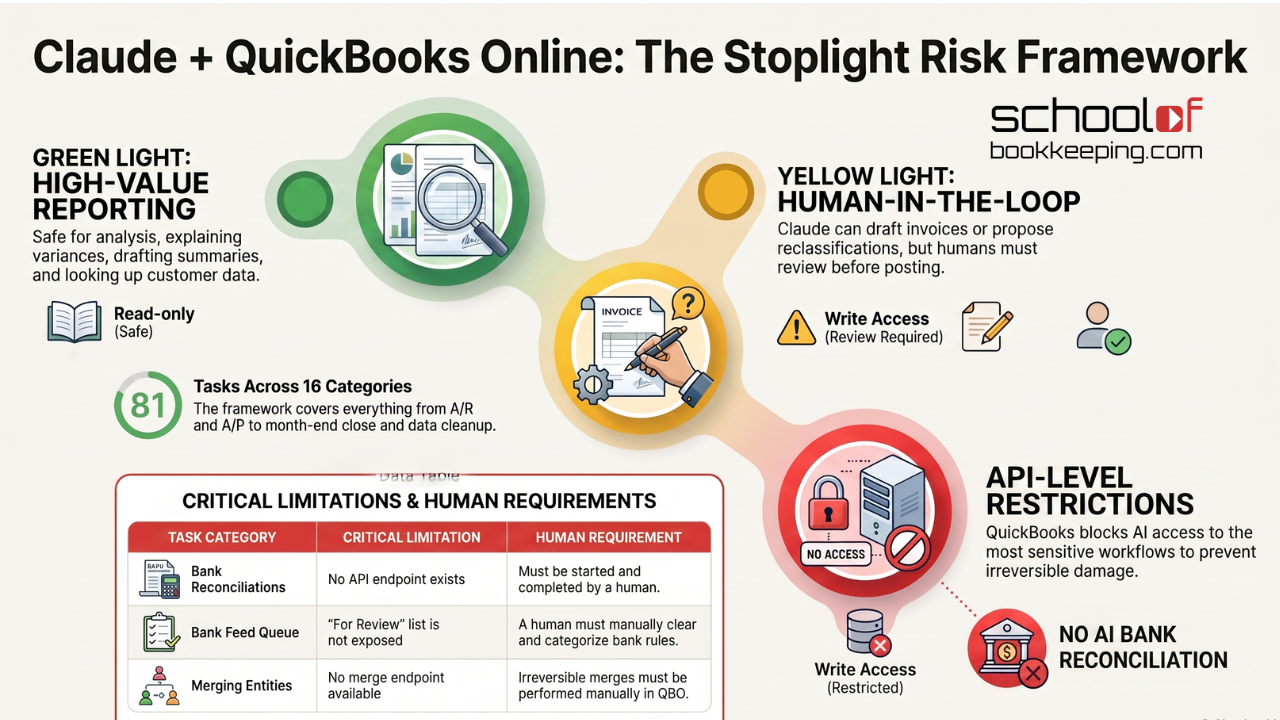
A few weeks ago we published Connect Claude to QuickBooks Online? The short version: read-only use (reporting, analysis) is usually low risk and high value. Write access (creating, editing, deleting transactions) is riskier than most people assume, because QuickBooks transactions are linked to each other in ways that don't always show up on screen, and a "small edit" can break something you can't fully undo.
That post asked people to think in terms of green light, yellow light, and red light tasks before they connect anything. The most common reply we got back was some version of: "Okay, but what does that actually look like task by task?"
Fair question. So we built the answer.
The Task List, Made Searchable
We put together a categorized, searchable reference of 81 tasks bookkeepers, accountants, and business owners can hand off to Claude once it's connected to QuickBooks Online, organized across 16 functional areas: invoicing and sales, expenses and bills, banking and reconciliation, customers and A/R, vendors and A/P, chart of accounts and journal entries, reporting and analysis, sales tax, payroll, inventory, time tracking and projects, budgeting, month-end and year-end close, data cleanup, automation, and multi-client practice management.Every task in the widget includes two things our first post only covered in general terms:
- A known limitation. Where the QuickBooks API actually stops Claude from doing something, or does it differently than you'd expect.
- A recommended alternative. What to use instead, or how to work around the gap, when QBO's connected API isn't the right tool for that particular job.
Search it, filter by category, and click into any task to see both.
Reading the List Through the Same Risk Lens
If you read the original post, you already know the framework. Here's how it maps onto the widget's 16 categories:
Green light (reporting and analysis) covers most of Reporting & Financial Analysis, Customers & A/R lookups, Budgeting & Forecasting, and Data Cleanup planning. This is Claude reading your numbers back to you, explaining variances, and drafting summaries. Low risk, and honestly where most of the time savings live.
Yellow light (review before it's final) covers Invoicing & Sales, Expenses & Bills entry, and Chart of Accounts & Journal Entries. Claude can draft an invoice, code a bill, or propose a reclassifying entry, but someone should look at it before it goes out the door or posts to the ledger, the same standard the original post applied to sales documents.
Red light, or just not possible is where this new list actually reinforces the original post's central warning, from a different angle. A few of the "known limitations" in the widget aren't really limitations so much as the same guardrails our first post argued you should be building for yourself, except Intuit already built them into the API:
- Reconciliation has no API endpoint at all. Claude cannot start, complete, or check the live status of a bank reconciliation, full stop. Given that the scariest scenario in our original post involved a linked-transaction edit that quietly broke reporting, it's worth knowing that the single most sensitive workflow in your books is one Claude structurally cannot touch on its own.
- The bank feed "For Review" queue isn't exposed either. No reading it, no acting on it, no creating bank rules through the API. That queue has to be cleared by a human in QuickBooks itself.
- There's no merge endpoint for customers or vendors. Merging is a manual, irreversible action Intuit deliberately kept out of the API, for the same reason our first post flagged edits to linked transactions as the highest-risk category: merges touch transaction history in ways that are hard to unwind.
- Payroll sits behind a separate, far more restricted API. The general QuickBooks Accounting connector (including Claude's) typically can't reach payroll run detail or employee-level data at all.
None of that is a knock on Claude. It's the opposite: it's confirmation that the riskiest corners of your books are the ones QuickBooks' own architecture, not Claude's judgment, keeps out of reach. The judgment call is still yours for everything else on the list.
How to Use This
Pull up the widget, search for whatever's eating your time this week, whether that's chasing overdue invoices, prepping a books cleanup for a new client, or building a month-end close checklist, and read the limitation and alternative for that specific task before you hand it over. If it's a green-light reporting task, go ahead. If it touches linked transactions or anything irreversible, treat it the way our original post suggested: use Claude as the analyst and drafter, and keep a human at the wheel for anything that edits your books directly.
If you haven't already, read Connect Claude to QuickBooks Online? first. This list is the detail; that post is the judgment call underneath it.
If you would like to learn more tips and tricks, click here to access our entire course library!!
Stay connected with news and updates!
Join our mailing list to receive the latest news and updates from our team.
Don't worry, your information will not be shared.
We hate SPAM. We will never sell your information, for any reason.
