
QuickBooks Online Customer Hub: What It Does, and What You Get by Plan
If you have logged into QuickBooks Online lately and thought, “Why does my accounting software suddenly want to be a mini CRM,” you are not imagining it. Intuit has been rolling out Customer Hub, a section built around leads, proposals, and customer follow-up, not just invoices and reports.
Here is what Customer Hub actually does, and what changes depending on your QuickBooks Online plan.
What is Customer Hub?
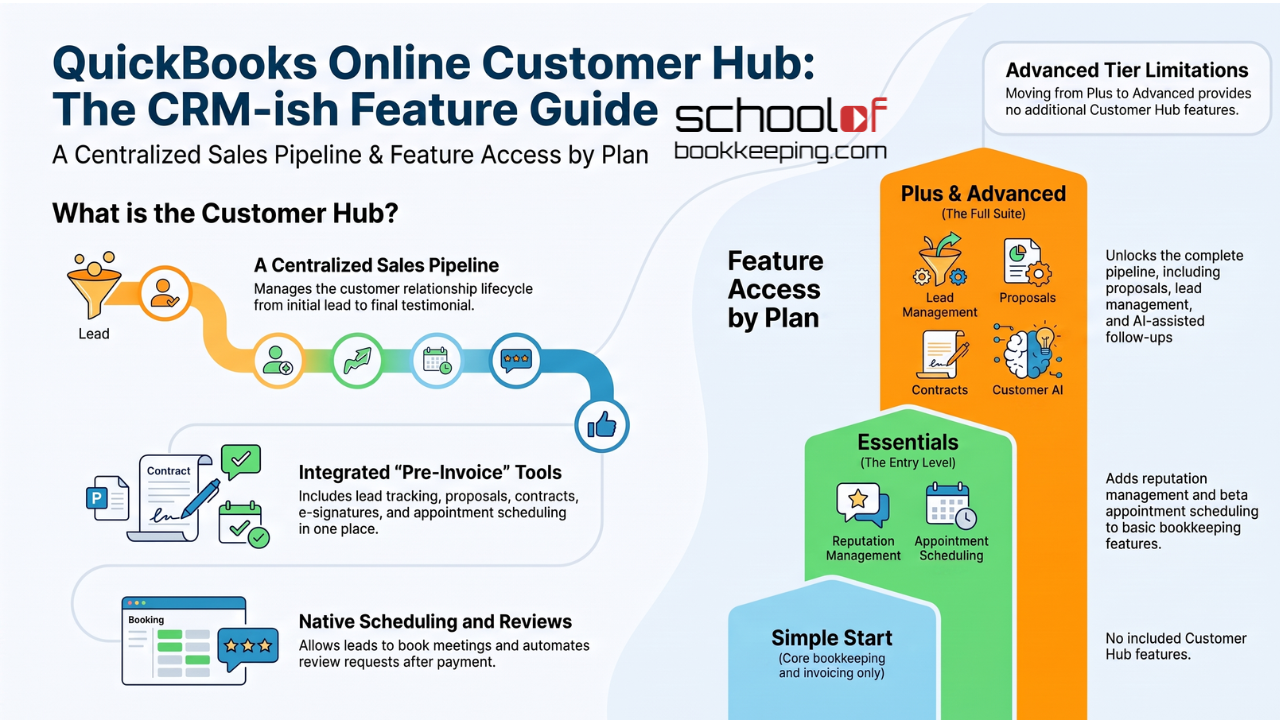
Customer Hub pulls together the front end of the customer relationship, meaning the stuff that happens before the invoice, and sometimes right after. Think:
- Leads and referrals
- Estimates and proposals
- Contracts and e-signatures
- Appointments (phone/video)
- Reviews and testimonials
Intuit’s pitch is that you can “manage referrals, leads, phone and video meetings, and more in one place.” Translation, they want you to stay inside QuickBooks instead of bouncing between a CRM, a scheduler, and your inbox.
Every paid QuickBooks Online plan includes some version of Customer Hub, but the useful parts show up as you move up the tiers.
Customer Hub features by plan
Simple Start
Simple Start is mostly about core bookkeeping: invoicing, basic reporting, automated categorization, bill pay, that kind of thing.
You do not get the growth-focused Customer Hub features here.
Essentials (and up)
Starting at Essentials, Customer Hub starts acting like it is trying to help you get customers, not just bill them.
You typically get:
- Reputation management QuickBooks can prompt customers for reviews and referrals after they pay an invoice, or you can send a link directly. If a testimonial is approved, you can copy it to your website.
- Appointment scheduling (beta) Leads and customers can book phone or video meetings with you through QuickBooks. It is positioned as a built-in scheduler, so you are not forced to live in a separate scheduling tool.
Plus and Advanced
Plus (and Advanced) is where Customer Hub becomes more “sales pipeline” and less “nice add-on.”
You get everything in Essentials, plus:
- Proposals Build and send proposals that look more polished than a basic estimate, with e-signature approval and the option to collect a deposit online.
- Lead management and contracts Track leads through a pipeline and store signed contracts in one place, so you can see where people are getting stuck.
- Customer AI (Customer Agent, beta) This connects to your email (Gmail or Outlook), scans for leads, flags “hot” and “warm” opportunities, and helps draft follow-ups and estimates for you to review and send.
One important detail: Advanced does not really add extra Customer Hub features beyond Plus. If you are upgrading from Plus to Advanced, you are paying for other Advanced goodies (permissions, automation, batch workflows, etc.), not because Customer Hub suddenly levels up.
Quick note on the name “Customer Hub”
Intuit has been using “Customer Hub” to mean more than one thing lately.
- There is Customer Hub inside QuickBooks Online (this article), aimed at helping a business manage its own leads and customers.
- And there is also a Customer Hub concept inside Intuit’s accountant-facing platform (Intuit Accountant Suite, replacing QuickBooks Online Accountant), which is about accountants managing their client list.
Same name, different audience, different tool. This write-up is about the QuickBooks Online version.
Bottom line
- Simple Start: basically invoicing and bookkeeping, not much Customer Hub value.
- Essentials: adds reputation management and scheduling.
- Plus: the real starting line if you care about proposals, lead tracking, and AI-assisted follow-up.
- Advanced: does not add more Customer Hub features than Plus.
A few pieces (Appointments, Customer AI) are still labeled beta, so if something feels half-baked, that is because it probably is.
Sources
- Get New Customers, Reviews, and Referrals — QuickBooks: https://quickbooks.intuit.com/get-customers/
- Add and manage customers in QuickBooks Online — QuickBooks Support: https://quickbooks.intuit.com/learn-support/en-au/help-article/manage-customers/add-manage-customers-quickbooks-online/L0M9mMZmd_AU_en_AU
If you would like to learn more tips and tricks, click here to access our entire course library!!
Stay connected with news and updates!
Join our mailing list to receive the latest news and updates from our team.
Don't worry, your information will not be shared.
We hate SPAM. We will never sell your information, for any reason.
